Chapter 4 SQL I
4.1 What is a Database?
A database is a structured collection of data stored electronically, typically organized in tables and managed using a database management system (DBMS).
In this course, we will focus on relational databases, which are the most widely used and are managed using SQL.
4.2 What is SQL?
SQL (Structured Query Language) is a language used to query, manipulate, and transform data in relational database systems. It is designed to be accessible to both technical and non-technical users.
SQL commands are categorized into four main types:

Figure 4.1: Structure of SQL commands
4.3 Relational Databases
A relational database consists of a collection of relations. Each of which is assigned a unique name.

Figure 4.2: Three relations instructor (top-left), teaches (top-right) and course (bottom).
A relation is:
a table consisting columns and rows,
each column is called an attribute,
each row of the relation is called a tuple.

Figure 4.3: Relation = table, attribute = column, tuple = row.
4.4 DB Browser for SQLite
- Visit this link to download DB4S https://sqlitebrowser.org/dl/
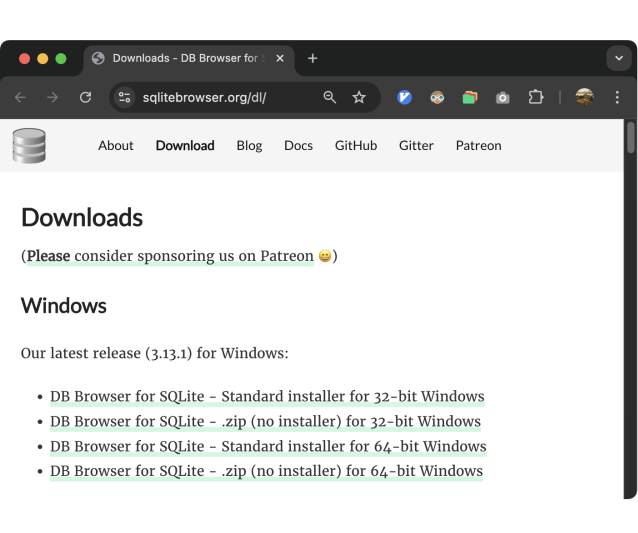
- Install it as you would any other application.
4.5 Getting Started
4.5.1 Creating First Database
Example 4.1 (Creating Your First Database)
Follow the steps shown in the image to create the university database using
the DB4S interface.

Figure 4.4: Create university database in SQLite using DB4S
4.5.2 Creating First Table
(Creating Your First Table)
Read the following SQL code, and use the DB4S interface to create your first
table, instructor.
CREATE TABLE instructor (
    instructor_id TEXT PRIMARY KEY,
    name TEXT,
    dept_name TEXT,
    salary NUMERIC
);
Hint:

Figure 4.5: Create instructor table
Datatypes & Constraints (Click to Expand)
| Category | Data Type | Description |
|---|---|---|
| Numeric | INTEGER | Whole numbers (1, 2, 3…). May be 1, 2, 4, 6, or 8 bytes depending on value. |
| Numeric | REAL | Floating-point numbers. |
| Text | TEXT | Text strings, stored as Unicode. |
| Blob | BLOB | Binary large objects, for images, files, etc. |
| Special | NULL | Represents missing or undefined values. |
| Constraint | Syntax | Description |
|---|---|---|
| PRIMARY KEY |
PRIMARY KEY (column)
|
Ensures each row has a unique, non-null identifier |
| FOREIGN KEY |
FOREIGN KEY (column) REFERENCES table(column)
|
Ensures values exist in another table (referential integrity) |
| NOT NULL |
column_name datatype NOT NULL
|
Prevents NULL values in this column |
4.5.3 Inserting Data
Example 4.2 (Inserting Records into instructor Table)
Given the following table, use the DB4S interface to insert data into the table
instructor.
| instructor_id | name | dept_name | salary |
|---|---|---|---|
| 10101 | Srinivasan | Comp. Sci. | 65000 |
| 12121 | Wu | Finance | 90000 |
| 15151 | Mozart | Music | 40000 |
| 22222 | Einstein | Physics | 95000 |
| 32343 | El Said | History | 60000 |
| 33456 | Gold | Physics | 87000 |
| 45565 | Katz | Comp. Sci. | 75000 |
| 58583 | Califieri | History | 62000 |
| 76543 | Singh | Finance | 80000 |
| 76766 | Crick | Biology | 72000 |
| 83821 | Brandt | Comp. Sci. | 92000 |
| 98345 | Kim | Elec. Eng. | 80000 |
Hint:

Figure 4.6: Inserting data
So far, you’ve created your first database and table, and inserted data using the DB4S interface. Next, we’ll learn how to interact with the database using SQL commands.
4.6 SQL Commands
4.6.1 CREATE
The CREATE is used to create database and its objects such as tables, indexes,
views.
Example 4.3 Write an SQL command to create the course table in the university database
(do not insert data yet).
| course_id | title | dept_name | credits |
|---|---|---|---|
| BIO-101 | Intro. to Biology | Biology | 4 |
| BIO-301 | Genetics | Biology | 4 |
| BIO-399 | Computational Biology | Biology | 3 |
| CS-101 | Intro. to Computer Science | Comp. Sci. | 4 |
| CS-190 | Game Design | Comp. Sci. | 4 |
| CS-315 | Robotics | Comp. Sci. | 3 |
| CS-319 | Image Processing | Comp. Sci. | 3 |
| CS-347 | Database System Concepts | Comp. Sci. | 3 |
| EE-181 | Intro. to Digital Systems | Elec. Eng. | 3 |
| FIN-201 | Investment Banking | Finance | 3 |
| HIS-351 | World History | History | 3 |
| MU-199 | Music Video Production | Music | 3 |
| PHY-101 | Physical Principles | Physics | 4 |
To do this, you need to click the Execute SQL tab

Figure 4.7: Writing SQL command in DB4S.
4.6.2 INSERT INTO
INSERT INTO is used to insert data into a table.
-- Add data to a table
-- Option 1: Specify columns (recommended, order matters)
INSERT INTO mytable (column1, column2)
VALUES
  (value1, value2),   -- row 1
  (value3, value4)    -- row 2
  ...;

-- Option 2: Omit columns if you provide ALL of them
-- and in the EXACT same order as the table definition
INSERT INTO mytable
VALUES
  (value1, value2),   -- row 1
  (value3, value4)    -- row 2
  ...;
Example 4.4 (Add Data to course Table)
Use the data from course table in example Example 4.3,
write an SQL command to insert rows into this table.
Solution.
INSERT INTO course (course_id, title, dept_name, credits)
VALUES
  ('BIO-101', 'Intro. to Biology',            'Biology',    4),
  ('BIO-301', 'Genetics',                     'Biology',    4),
  ('BIO-399', 'Computational Biology',        'Biology',    3),
  ('CS-101',  'Intro. to Computer Science',   'Comp. Sci.', 4),
  ('CS-190',  'Game Design',                  'Comp. Sci.', 4),
  ('CS-315',  'Robotics',                     'Comp. Sci.', 3),
  ('CS-319',  'Image Processing',             'Comp. Sci.', 3),
  ('CS-347',  'Database System Concepts',     'Comp. Sci.', 3),
  ('EE-181',  'Intro. to Digital Systems',    'Elec. Eng.', 3),
  ('FIN-201', 'Investment Banking',           'Finance',    3),
  ('HIS-351', 'World History',                'History',    3),
  ('MU-199',  'Music Video Production',       'Music',      3),
  ('PHY-101', 'Physical Principles',          'Physics',    4);
4.6.3 UPDATE
The UPDATE command is used to modify existing data in a table.
Example 4.5 Update Kim’s dept_name to Math and set her salary to 100,000.
Solution.
##    instructor_id       name  dept_name salary
## 1          10101 Srinivasan Comp. Sci.  65000
## 2          12121         Wu    Finance  90000
## 3          15151     Mozart      Music  40000
## 4          22222   Einstein    Physics  95000
## 5          32343    El Said    History  60000
## 6          33456       Gold    Physics  87000
## 7          45565       Katz Comp. Sci.  75000
## 8          58583  Califieri    History  62000
## 9          76543      Singh    Finance  80000
## 10         76766      Crick    Biology  72000
## 11         83821     Brandt Comp. Sci.  92000
## 12         98345        Kim       Math 100000
4.6.4 DELETE
The DELETE command is used to remove one or more rows from a table.
Remark. Be careful when delete records in the table. If the WHERE clause is omitted,
all records in the table will be deleted.
Example 4.6 Delete all course records from the Biology department.
Before deletion
##    course_id                      title  dept_name credits
## 1    BIO-101          Intro. to Biology    Biology       4
## 2    BIO-301                   Genetics    Biology       4
## 3    BIO-399      Computational Biology    Biology       3
## 4     CS-101 Intro. to Computer Science Comp. Sci.       4
## 5     CS-190                Game Design Comp. Sci.       4
## 6     CS-315                   Robotics Comp. Sci.       3
## 7     CS-319           Image Processing Comp. Sci.       3
## 8     CS-347   Database System Concepts Comp. Sci.       3
## 9     EE-181  Intro. to Digital Systems Elec. Eng.       3
## 10   FIN-201         Investment Banking    Finance       3
## 11   HIS-351              World History    History       3
## 12    MU-199     Music Video Production      Music       3
## 13   PHY-101        Physical Principles    Physics       4
After deletion
##    course_id                      title  dept_name credits
## 1     CS-101 Intro. to Computer Science Comp. Sci.       4
## 2     CS-190                Game Design Comp. Sci.       4
## 3     CS-315                   Robotics Comp. Sci.       3
## 4     CS-319           Image Processing Comp. Sci.       3
## 5     CS-347   Database System Concepts Comp. Sci.       3
## 6     EE-181  Intro. to Digital Systems Elec. Eng.       3
## 7    FIN-201         Investment Banking    Finance       3
## 8    HIS-351              World History    History       3
## 9     MU-199     Music Video Production      Music       3
## 10   PHY-101        Physical Principles    Physics       4
Homework
Complete this as individual work (not group work)
- Write SQL command to create table
teachesand populate it with data.
| instructor_id | course_id | sec_id | semester | year |
|---|---|---|---|---|
| 10101 | CS-101 | 1 | Fall | 2017 |
| 10101 | CS-315 | 1 | Spring | 2018 |
| 10101 | CS-347 | 1 | Fall | 2017 |
| 12121 | FIN-201 | 1 | Spring | 2018 |
| 15151 | MU-199 | 1 | Spring | 2018 |
| 22222 | PHY-101 | 1 | Fall | 2017 |
| 32343 | HIS-351 | 1 | Spring | 2018 |
| 45565 | CS-101 | 1 | Spring | 2018 |
| 45565 | CS-319 | 1 | Spring | 2018 |
| 76766 | BIO-101 | 1 | Summer | 2017 |
| 76766 | BIO-301 | 1 | Summer | 2018 |
| 83821 | CS-190 | 1 | Spring | 2017 |
| 83821 | CS-190 | 2 | Spring | 2017 |
| 83821 | CS-319 | 2 | Spring | 2018 |
| 98345 | EE-181 | 1 | Spring | 2017 |
In the
teachestable, update all Computer Science courses so that their semester is set to Summer.Hint: Use the appropriate operator from the table below to accomplish the task.
Table 4.3: Examples of the LIKE operator in SQLite
LIKE Operator
Description
WHERE name LIKE ‘a%’
Finds values that start with ‘a’
WHERE name LIKE ‘%a’
Finds values that end with ‘a’
WHERE name LIKE ‘%or%’
Finds values that have ‘or’ in any position
WHERE name LIKE ’_r%’
Finds values that have ‘r’ in the second position
WHERE name LIKE ‘a_%’
Finds values that start with ‘a’ and are at least 2 characters long
WHERE name LIKE ’a__%’
Finds values that start with ‘a’ and are at least 3 characters long
WHERE name LIKE ‘a%o’
Finds values that start with ‘a’ and end with ‘o’